Custom OpenVINO Server — A Birthday Gift to Myself: How to Celebrate Your 50th Anniversary with the Best Wine — part 1.
I had never dreamed of writing a local LLM server — not in Python, not in anything. I know some good, simple, proven existing solutions like Ollama and I use them. I like simplicity — until I don’t.
After getting involved with running LLMs locally, I was struggling to understand how to use them effectively and efficiently.
Cloud-hosted models we all mostly have access to (Gemini, Claude, Copilot) are like “Gods of Digital War” compared to the tiny 3B or 7B models running on local devices.
To describe my inborn curiosity and stubbornness I usually bring back a childhood memory about toys I tore apart, because I was eager to find out how they work internally. I’m 50 years old today and still like to tear things apart to find out how they work.
So I bought an Intel Arc Pro B60 24GB VRAM and threw my RTX 3080 10GB in the bin — don’t look for it — my son picked it up immediately for his gaming PC.
For a casual home user the B60 is not an interesting card. Don’t buy it for CP2077 — it works, but there’s no comparison to Nvidia RTX, which makes Night City shine when you drive your bike through neon-filled streets.
What can you do with this card? Obviously, run LLMs on it. Ollama works under Windows and gives some possibilities. I tried. It’s boring — it just works, and the Vulkan intermediate layer eats its chunk of performance.
So… why not run it with Intel’s native stack, I thought to myself. How hard can that be? I can do it. Can I?
Let’s do a quick check:
- I have no clue about LLM servers or OpenVINO
- I run Ollama for daily work because it is easy
- I work as a serious manager for a programming team and I constantly have no time for coding
But — I have one advantage. I’m a programmer myself (C#, no Python though) and I have 25 years of experience managing technical staff across multiple fields, 10 of those in software development.
So the plan starts to take shape:
- Management skills — check.
- Experience — check.
- I just need to hire a Python developer. Not a cheap deal, though.
What is that Claude Pro subscription fee doing on my credit card bill?
Why have I never used it for more than chat and data analysis?
Let’s put that lazy, overpaid Claude to work for me.
So I hired Claude Code — and he (what are your pronouns, Claude?) decided to be my teammate and follow my suggestions. (Not.) Blindly.
Honestly — I trusted him on many points after he explained his whys, because I had already learned this from working with people: no one is perfect, everyone makes mistakes, you need to trust the people you hire.
But I learned one thing — your employee must understand what you expect from him, what he can and cannot do. He needs a contract, effectively.
I’m lazy, I didn’t want to dig through all the possible settings of the CC environment. I’m impatient (sorry, toys). I have ADHD symptoms.
So I decided to write my customised CLAUDE.md — which explains to Claude how to work for me and with me.
Check it out in the repo. It proved itself very effective — use it and give me your feedback.
Just be a good manager, I thought to myself — no need to tear anything apart here, Jerzy. (What a shame!)
My workstation HP ENVY T02 with i7–12700K CPU and sh*tty Blizzard motherboard (HP — forgive the honest truth) was hosting Nvidia RTX3080 10GB as I mentioned earlier.
Of course, first steps after fitting the B60 into it were painful. BIOS options do not showing Resizable BAR and it was something Claude was nagging me about constantly.
What is that? Couldn’t they make normal bar, why resizable? Simple definition of it — CPU extended access to VRAM on GPU card. Here important fact is that if you don’t switch it on in BIOS, performance between CPU and GPU degrades significantly.
Of course my BIOS has no such an option. Of course I was trying to figure out where can I find it. Effectively nowhere.
I switched my dusty Windows 11 on and started to look for Intel drivers and BIOS upadate for my Blizzard motherboard. Found it, installed it. Took me around two hours to make it right.
Long story short. After updating my motherboard BIOS, installing newest available drivers for Arc Battleimage family I saw on my screen nice green dot which said: Resizeble BAR -ON.
So it exists, it is on and I don’t have to dig in BIOS anymore. Switch back to Linux now, it is easier to make something work when you know you have that thing in your PC in the firstplace.
Linux Mint is great — yeah, I know you were expecting me to be running Arch (actually) or maybe not — but Mint relies on a well-seasoned kernel (6.12). That well-seasoned kernel had no clue that Intel introduced the B60 in end of 2025. Shame on you, Intel — not calling your friend Kernel with such good news.
So me and Claude started looking for solutions. About an hour later we found that I could install experimental kernel version 6.17.0–1020-oem #20-Ubuntu SMP PREEMPT_DYNAMIC and it’s my Kernel now. Selected mainly because of impressive name of course. Check your version — ‘uname -a’.
It was genuinely a bit less painful than removing a front tooth with old, red-hot pliers — luckily only one kernel though, and not even removed, because you can plant and grow many. (Not teeth — kernels.)
Then came some adventures with library compatibility. To make the story shorter: OpenVINO stack is on 2026.1.0 (cutting-edge), transformers is 4.57.6 (very recent), torch is 2.11.0. Everything is current — no stale pinned versions. I saved details to github if you need those.
Damn, it’s quite a pack when I see it now. I remember those two long nights we spent with CC to make it all work together — vibe coding my ar*e!
If you look carefully you might ask what is infergate? It’s re-implantation of my own ideas which were born during custom server development. I decided to put them into separate library so you can try it out, just: pip install infergate. It’s version says Alpha still but it works well. Pace of pushes to PyPI comes from the fact that my two CC employees were building it and re-implementing it at once. It was working three weeks in my server already earlier moulded with it. Whole process of extracting and re-implementing it brought some improvements and ideas in my and Claude’s head. Perhaps this little thing and whole process should receive separate article here later.
Let’s get back to main story. After installing all required libs it was easy and all downhill from there. No, it wasn’t.
Ambitious idiots have a trait that makes them either dead or half-heroes. I’m still alive — so take your pick.
I went for OpenAI API compatibility because the main tool I had under Linux to experiment with was AnythingLLM. I knew I could chat in it, do RAG, put in a picture for recognition. Those were the first targets.
That went into the server over two nights — one for the skeleton, one for the basics:
Day 0 — April 21
Birth. Single commit: fcc5f41 — ”Initial commit — OpenVINO LLM server (FastAPI + openvino_genai)”
Day 1 — April 22 (18 commits in one day)
The server went from skeleton to working in a single session. All the foundations landed in rapid succession:
- Tool call support, streaming, model aliases
- LRU VRAM eviction with headroom checks
- AnythingLLM agent detection via system prompt
- Dynamic model discovery + config.json
- MODELS.md and path migration to /opt/ov_server
- VLM support — Qwen2.5-VL-7B via VLMPipeline
In the meantime I spent some time looking for models that were able to run on it. Do IR or OV sound familiar to you? They didn’t to me. This is Intel’s way of building model images for OpenVINO.
After those two nights of “vibe coding” I had a server that worked — a bit.
It was exciting to see it come to life so fast and to see just how mighty a tool CC really is.
I took a break and the long holiday weekend of May 1–3 arrived — barbecue in the sun. Finally, after this super long winter in Poland.
I hate weekends though if I can’t work and fuel my ADHD brain with creative thoughts. The only thing that can keep me away from the computer is my KTM 790 Adventure motorbike. Go, Horsey, go!
But the weather wasn’t great again and I don’t ride at night. So let’s look at that server and make it better.
First I thought that before it grows it needs some observability and proper configuration — it was all hardcoded at that stage, of course. Vibe coding effect.
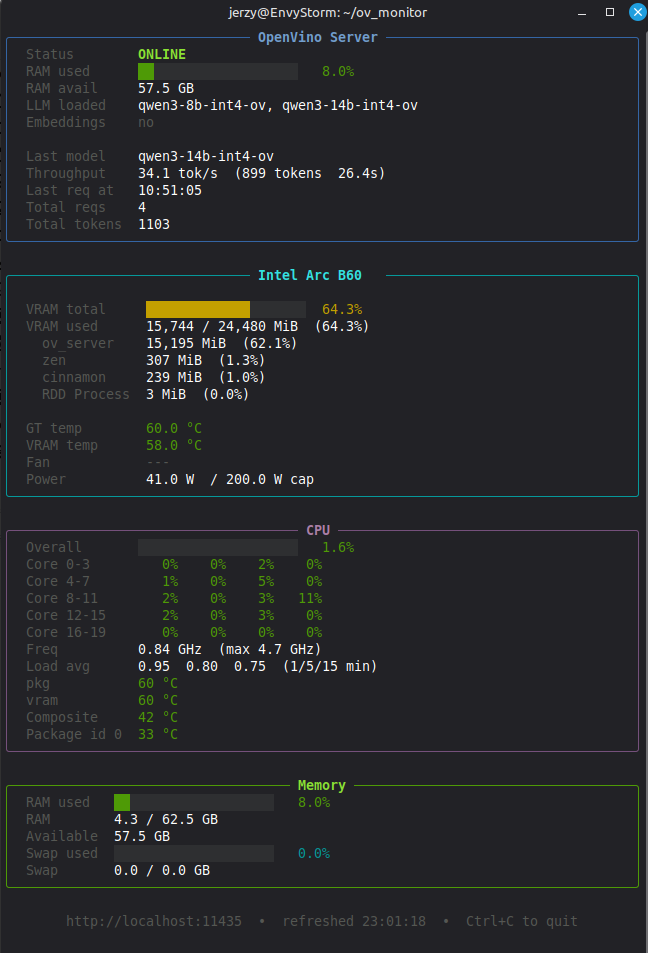
I also decided to generate a separate Python script to read GPU stats. That’s when I found out that Intel’s delivered tools don’t read B60 stats well — only partially. Luckily my brilliant co-worker found a way to read those stats directly from system files, and my monitor was born. You can see it in the Shangri-Lab repo. Picture here:
Then I decided — prematurely, idiot trait — that my B60 is so great that surely it could fuel Claude Code, and I started implementing Anthropic API support. After going through all of that (2 nights), I had a server with GPU visibility and barely functional CC support — practically unusable.
You start CC, write “hello” and… CC sends 4,000 tokens to the server. First attempts: 3 minutes to get a response to “hello.” Usually the wall in my room talks back much faster.
I managed to optimize — cripple it — on my server side by automatically cutting out most of that payload. Response time dropped to 40 seconds.
Great, I thought. I’ll die before we get halfway through a 100-line Python script.
So I went to sleep. They say good sleep makes you live longer. They might be right — but I like to try things out on my own first.
Is it over?
”Not yet, my friend. Not yet.” — Gladiator the movie
This story continues. [Part 2: Smart routing, VRAM lessons, and a button hiding in plain sight →]
Disclaimer: All opinions, ideas, choices and questionable purchasing decisions described here are exclusively my own. Intel makes good chips. I make trouble and solve some of it for myself. These are separate and independent activities.
Originally published on Medium, 15 May 2026.